Pixelyra: Android AI photo-to-video creative suite for social creators
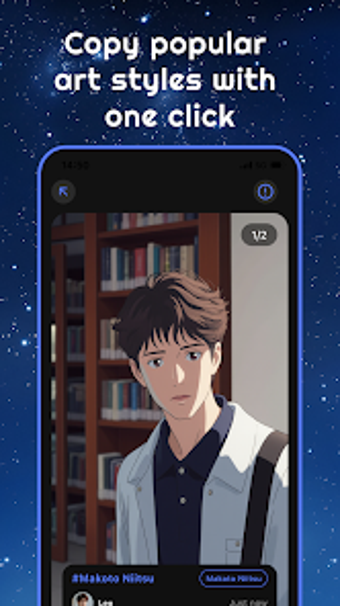
Experience Pixelyra, developed by DIGITALSURGE LIMITED, as an Android utility that converts ordinary photos into stylized visual content for sharing and creative projects. The app uses AI models to generate artwork and short animated clips from static images, automating complex edits into a single flow. Key functions include stylization, animated video generation, face and outfit swapping, portrait motion and scene transitions for quick content creation. It targets social media creators and casual users who want fast, trend-driven visuals without learning complex editors.
How demanding are Pixelyra's AI tasks on Android devices?
Moreover, the product notes state that system requirements typically include a modern version of the Android OS to support AI processing tasks, so device capability is an explicit consideration. That phrasing implies heavier compute needs during generation steps rather than trivial edits. Users should expect the app to rely on the device's processing pipeline for visual synthesis, and to plan large batches for times when the device has available CPU, GPU, or battery headroom.
What privacy and permission considerations should users expect?
In addition, Pixelyra lists face and outfit swapping plus portrait animation as built-in capabilities, which create altered likenesses from personal photos. The available description documents those features but does not detail permission handling or storage behaviour for generated files. For that reason, users should verify runtime permissions and file export settings in the app prior to sharing manipulated images, especially when working with identifiable faces.
Can non-technical creators produce shareable content quickly?
Nevertheless, the workflow emphasis is on minimal manual input: the developer highlights a one-tap creation flow that reduces the number of steps needed to produce output. That approach places the work on automated processing rather than manual layering, which benefits users who prioritise speed over granular control. Outputs are oriented toward short, social-format clips and stylised images intended for rapid posting rather than long-form editing projects.
Who benefits most from Pixelyra's automated visual tools?
Moreover, the app suits creators looking for trend-driven visuals and a straightforward production path. DIGITALSURGE positions the tool within AI-integrated creative utilities, and early listing details identify these primary audiences:
- Social media creators seeking quick visual posts
- Digital art enthusiasts experimenting with AI styles
- Casual users wanting animated portraits without learning editors
As a recent release on the Android store, Pixelyra is still building its user base and ratings are accumulating, which readers should note when judging maturity.
Good fit for fast social visuals, but needs capable hardware
Pixelyra is a practical option for social creators and casual artists who need rapid AI-generated images and short animations. It favours automated workflows that lower the time to finished content, making production accessible. Single drawback: the app depends on a modern Android environment for AI processing, so older devices may struggle. Tip: schedule larger generation tasks while the device is charging or during idle periods to reduce interruptions.